

The 3 Minute Demo
See our bulk analysis product in action with our detailed demo. Our bulk analysis product enables you to upload files containing thousands of product identifiers and receive comprehensive analysis results for all products in one go. This is a great way to get a quick overview of your product catalogs and identify potential opportunities.Supported Product Codes
Types of product identifiers that can be analyzed:File Format Guidelines
Rivin requires a specific file structure for parsing. Your file must follow these strict formatting requirements to be processed successfully.Supported File Types
- Excel files (.xlsx, .xls)
- CSV files (.csv)
Required Column Headers
Your file must have clear, descriptive column names in the first row. Our system uses strict column mapping based on exact header names. Column headers must match the following requirements:Required Column:
- “UPC” or “EAN” - for product identifiers (Required)
Optional Columns:
- “Price” or “Cost” - for supplier prices (if providing pricing data)
- “Length”, “Width”, “Height” - for dimensions (if providing dimension data)
- “Weight” - for product weight (if providing weight data)
Column Header Requirements:
- Headers must be in the first row of your file
- Headers must match exactly (case-sensitive)
- Generic names like “Column A”, “Data 1” are not accepted
- Abbreviations that aren’t clear are not accepted
- Special characters or symbols are not accepted
- Very long column names are not accepted
File Structure Requirements
Example File Format
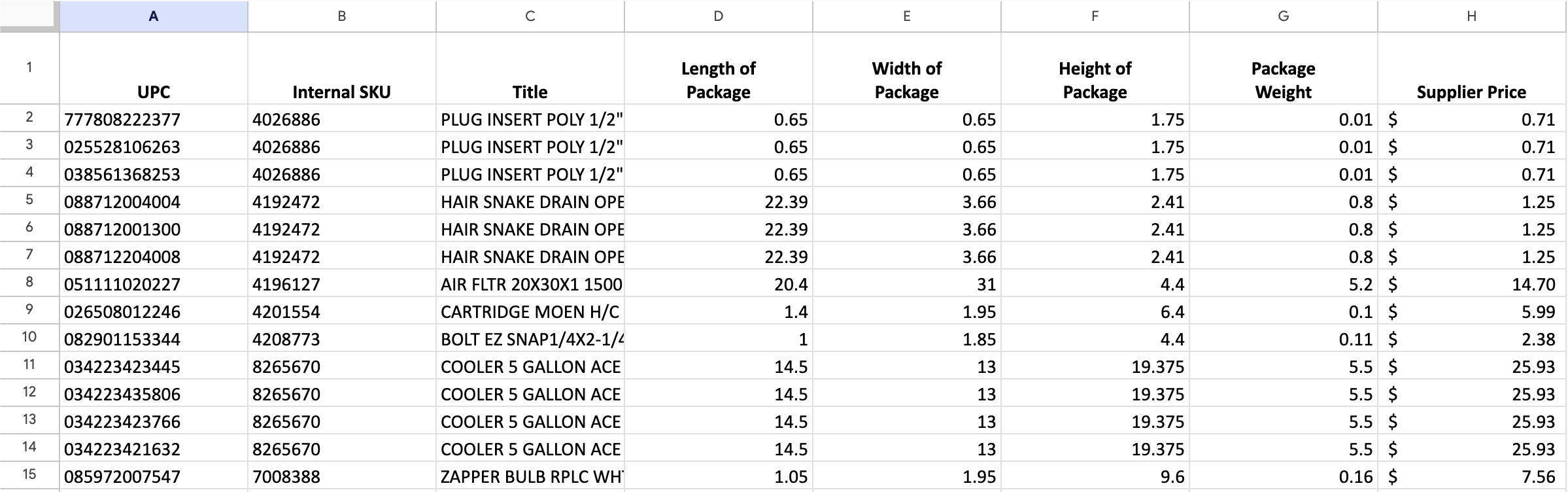
Important: Dimensions & Weight FormatIf you want to use your own dimensions and weight data, each measurement must be in its own column with these exact header names:
- “length” - Product length in inches
- “width” - Product width in inches
- “height” - Product height in inches
- “weight” - Product weight in pounds
What You’ll Get
Comprehensive analysis results for each product in your file.Product Information
- Walmart product code and canonical URL
- Product title, brand, and category
- Current buybox price and seller
- Number of offers and selling status
- Monthly units sold estimates
- Product dimensions and weight (from multiple sources)
Profitability Analysis
- Walmart referral fee percentage and amount
- WFS (Walmart Fulfillment Services) fees
- Net profit calculation
- ROI percentage
- Profit margin percentage
Frequently Asked Questions
What is the maximum number of products I can analyze at once?
The maximum number of products per file depends on your subscription plan:- Base Plan: Up to 100,000 products per month
- Pro Plan: Up to 250,000 products per month
- Enterprise Plan: Custom limits available
How long does the analysis take?
Processing time varies based on the number of products and current system load. Typically, you can expect to process products at around two minutes plus two additional minutes per 5,000 products:- Small batches (≤2,000): 2-3 minutes
- Medium batches (2,001-6,000): 5-7 minutes
- Large batches (6,001+): 2 minutes + 2 minute per 5,000 products
What happens if some product codes are invalid?
The system will continue processing valid codes and provide a report of any invalid codes encountered. You’ll receive detailed error messages explaining why specific codes couldn’t be processed.How accurate are the profitability calculations?
Profitability calculations use real-time data and official fee structures:- Current pricing: Real-time buybox prices from Walmart
- Official fees: Walmart’s current referral fee percentages
- WFS fees: Calculated based on actual dimensions and weight
- Multiple sources: Prioritized data from most reliable sources
Can I save or export the analysis results?
Yes, analysis results are:- stored in your account for future access
- available for download in CSV format
- available for download with filtering applied in CSV format
What if I need to process more than the plan limits?
If you need to process more products than your current plan allows:- Upgrade your plan by contacting us: Higher tiers support larger files